
Follow these steps to upgrade the firmware and install additional console marquee artwork for your Super PixelcadeLCD marquee. Download and install the following programs to the Windows based PC that is running your Arcade front end.
Step 1: Download and install the firmware update for Super PixelcadeLCD.
Step 2: Download and install the art pack update * for Super PixelcadeLCD. Note this is a 2 GB download. After downloading, this update will take between 30 minutes and 3 hours to complete depending on the WiFi signal strength of your Arcade PC. VERY IMPORTANT: Do not reboot Super PixelcadeLCD for at least 45 minutes after this step has completed as the art pack will extract files in the background.
Step 3: Download and install the latest Pixelcade software on your Arcade PC. Note that Pixelcade software 3.4.7 or higher is required.
Step 4 (Optional): If using Big Bix, Download and install this art pack for console / system marquees.
Step 5: After approximately 45 min after step 2, try these three tests:
- Test 1
Click here and you should see this logo.

- Test 2
Click here and you should see this marquee.

- Test 3
Click here and you should see this Apple II logo.

If those tests succeeded, then the upgrades completed successfully. Go ahead and then do a reboot of both Super PixelcadeLCD and your Arcade PC.
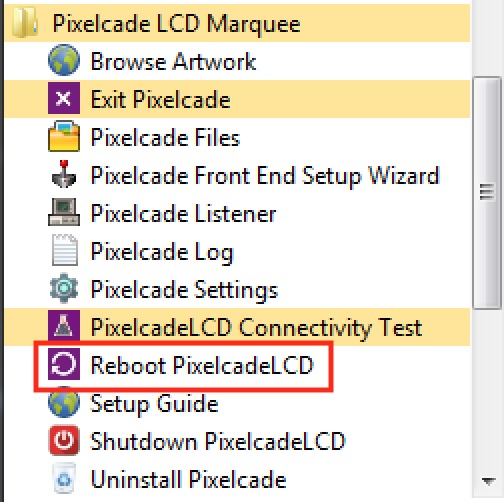
Note that you can click “Reboot PixelcadeLCD” to reboot Super PixelcadeLCD.
* The art pack includes marquee artwork for the following systems/consoles:
- Amiga
- Apple2
- Atari 2600
- Atari 5200
- Atari 7800
- Atari Jaguar
- Atari Lynx
- Bally Astrocade
- Commodore 64
- Coleco Vision
- Dreamcast
- Future Pinball
- Game Gear
- Game Boy
- Game Boy Advanced
- Game Boy Color
- Genesis
- Intellivision
- Locomalito Games
- Megadrive
- Microsoft DOS
- Microsoft XBox
- Nintendo 64
- NEC Turbografx 16
- Nintendo Entertainment System (NES)
- Nintendo Famicom
- Nintendo Famicom Disk System
- Nintendo Game and Watch
- Nintendo Gamecube
- Nintendo Wii
- Nintendo Wii U
- Pcengine
- Pinball FX2
- Pinball FX3
- Pop Cap
- Sony Playstation (psx)
- Sony Playstation 2
- Sony Playstation 3 (limited)
- Sony PSP
- Scumm VM
- Sega Saturn
- Sega CD
- Super Nintendo Entertainment System (snes)
- Taito Type X
- Vectrex
- Virtual Boy
- Visual Pinball
- Watara Supervision