
Pixelcade LCD Firmware Features
How to Update Pixelcade LCD Firmware
Running Pixelcade LCD Firmware 7.x or later? Use the Pixelcade mobile app to keep your device up to date — it’s the easiest way.
On an older version below 7.x? You have two options: use one of the update methods below, or re-image your Pixelcade LCD microSD card from scratch. To get the re-image download, join the Pixelcade Discord, DM proof of purchase, and a Google Drive link will be sent your way.
Windows
Launch “Pixelcade LCD Artwork and Firmware Updater”
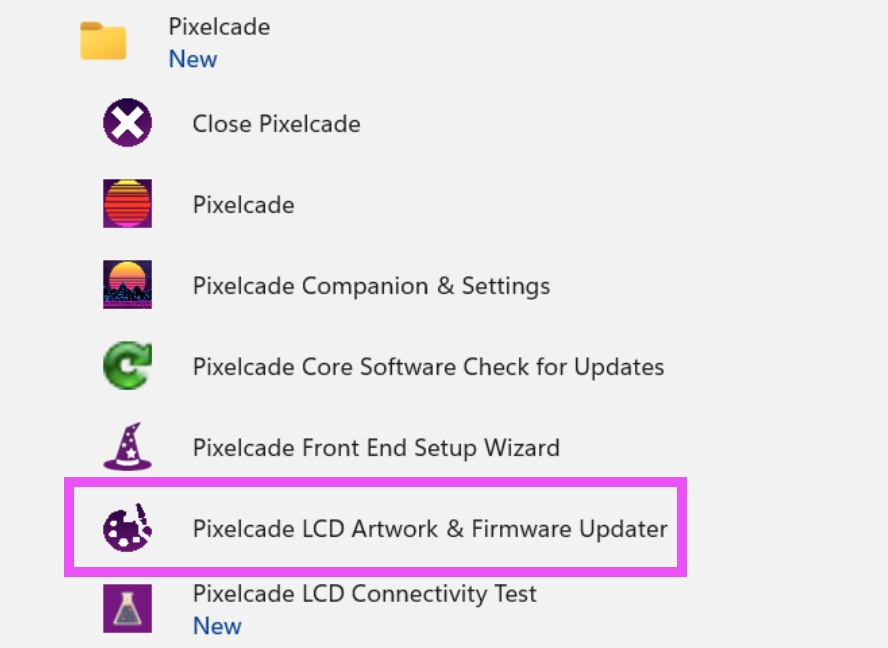
Linux
ssh into your Linux machine and run this command
curl -kLO https://raw.githubusercontent.com/alinke/pixelcade-linux-builds/main/lcdupdater/lcdupdater.sh && chmod +x lcdupdater.sh && ./lcdupdater.sh
Pixelcade LCD Firmware Release Notes
7.8.7
- Speed improvements and goes to default marquee on front end exit. New Alt Marquees: turn on Show Alt Marquees in Settings > Artwork to use alternate marquees, browse them with Alt Marquees Only, and upload your own from Upload Artwork. Faster, more accurate artwork matching (names with (World)/(USA) etc. now match)
7.8.6
- Added Glen's Retro Show FU cab branding
7.8.5
- Fixed broken sports widget
7.8.4
- Various WiFi fixes for Gen4/Orange Pi Zero 3 based Pixelcade LCDs
7.8.2
- Added LCD Pulse Sync mode which allows the LCD to sync with the Pulse sub-displays and LED trips connected to a Pixelcade LED board
7.7.8
- New widges: Day in Retro, Retro Achievements, Earthquakes, F1, and Planes Overhead
- Fixed horrorscope widget (prior API provider was no longer supported)
- Added support for Movie and TV show to the Plex widget (it only registered music prior)
- Added info boxes to each widget settings page to explain what the widget does and how it works
- Most widgets now also update the Pixelcade Pulse sub-displays (mini LCD, 7-segment, and dot matrix) when they are connected
7.7.7
- Artwork force update fixes
7.7.6
- Added Jellyfin/Emby Now Playing widget and integrated them with What to Watch widget
7.7.5
- Sorting release notes now by most recent first and limit to top 50 with an expand all option
- New widges: What to Watch, Retro Trivia, Recipes, Twitch Live, Countdown Timer
- Fixed broken widgets: Netflix Top 10, Horrorscope, Google Tasks and Photos
- Restyled the Widget tiles
7.7.4
- Artwork update fixes for 1280 x 390 Pixelcades
7.7.3
- This call now works too for mameoutputs http://pixelcadedx-xxxxxxxx.local:8080/arcade/stream/mameoutput/galaga_beam?l=3¬ext&nomini&nostrip
7.7.2
- Added a theme refresh icon allowing you to refresh the theme after an artwork update
7.7.1
- Added a new theme called Chroma, many thanks to Viking & Jason for contributing
7.7.0
- Added Galaga tractor beam, scared pacman blue ghosts, and pacman eyes in game animations
7.6.9
- Bug fixes to the theme switcher
7.6.8
- Enhancements to the ministat endpoint used by the Pulse mini LCD display
7.6.7
- Added branding tab to settings that will display builder specific default logos
- Added text filter on log page in Companion to make it easier to find specific log messages
7.6.5
- Logging clean up and system info box added to the Log page in Companion
7.6.4
- /arcade endpoint now supports a queue system with looping, just like LED does
- Settings tabs in Companion easier to see
- Added Support tab in Settings whichpw gives information about current setup in one page
- Bug fix when uploading a marquee with a hyphen in the name from Companion like Double Dragon V - The Shadow Falls (World).jpg for example
7.6.3
- Adding an alias now does not require a restart and is immediately available in the system, alias can also be deleted
- Added support for custom system names in aliases, so you can have an alias for a game that is different than the system marquee name
- User added marquees can now be deleted and will fall back to the system marquee if it exists
- Individual marquees can be replaced from the individual marquee info dialog
7.6.2
- Added mame output coin and start button effects for DOFLinx users
7.6.1
- Marquee download and alias bug fixed from Companion
7.6.0
- Added settings links to relevant Pixelcade LED settings pages (in game effects and custom system mappings)
7.5.9
- Added tabs to settings in Companion for better organization and easier navigation
- Fixed bug where uploading network was requiring a reboot, now its immediately available
- Added a new artwork theme selection that will change the default system & console marquees
- Improved marquees for: Game Boy, Game Boy Advanced, Game Gear, Game Gear Japan, and Sony PSP
- System marquee thumbnails now shown in Companion's Browse Marquees console list; marquee display no longer blocked by thumbnail loading
7.5.8
- Fixed /stats handler to use the right resolution
- Improved retroachievements effects with a random animation and cleaner achievements text
7.5.7
- Explosions will overlay when explosions are back to back
7.5.6
- More LCD explosion and other effects for DOFLinx in game and naming convention match to LED effects
7.5.5
- Adding LCD explosion and other effects for DOFLinx in game https://pixelcade.org/developers/#effects-lcd-only
7.5.4
- WiFi setup hotspot will not appear if USB is connected (but will not appear if Ethernet is connected)
7.5.2
- Network detection startup optimizations for Orange Pi Zero 2 boards
- Fixed bug where clock settings (24-hour or second hand) weren't being saved
- You can now add multiple sports tickers, each with different leagues to Pixelcade Attract Mode
7.5.1
- WiFi setup fix for Orange Pi Zero 3 boards
- Added user messages during startup when no Ethernet or USB connectivity
7.5.0
- Added support for Orange Pi Zero 3 boards
- pre-rendering for sports, news, and stocks widgets now much faster
- fixed score formatting on sports scoreboard when running in 1280 x 390 mode
- Removed pop up message when updating marquees from companion, instead each marquee turns grey briefly as it is updated
- Added error message for Netflix Top 10 widget if API times out
7.4.9
- shuffle option added to attract mode
7.4.8
- score display comma fix
7.4.7
- Added &nocomma param to the score display, remove comma automatically if score is over 1,000,000
- Added user defined Google API key for commmute traffic widget
7.4.6
- Added additional resolutions in Companion settings including for 14.9 1280 x390 screens
7.4.5
- Minor clock face improvements and you can change the clock face from Attact Mode
7.4.4
- Added more clock types: Pac-Man, Space Invaders, Tetris, Pong, Retro CRT, Donkey Kong, Frogger, Arkanoid, Galaga, Street Fighter, Dig Dug, and Rectangle
- Multiple clock types can now be added to Attract Mode
7.4.3
- Added progress bar in the Pixelcade app and Companion during firmware updates
- USB search fix for large number of files on USB (thousands)
- Added video only filter on browse marquees
7.4.2
- Added settings option to support BitLCD hardware using the external HDMI input
7.4.1
- Added ?nogif and ?novideo params to /arcade handler to prevent sending video marquees for that call
7.4.0
- Added default attract mode playlist and widget usability improvements
7.3.8
- Artwork update with 1,500+ new marquees
- Added incremental artwork updates so only new or changed artwork is downloaded vs. the whole repo every time
- Fixed bug where weather in Attract Mode wasn't using the settings
- Fixed AI marquee widget
7.3.7
- Weather widget UI and load time improvements
7.3.3
- Last game widget will display now when Attract mode is in no interrupt mode
7.3.2
- Google photos not always loading fix continued
- Attract mode was not being interrupted correctly
- Shuffle default option for news ticket and google photos so they don't always start from the same sources
- Faster load time for news feed
- Added widget that simply shows the marquee of the current/last selected game
7.3.1
- New Widgets: Plex Now Playing, Yahoo Fantasy, Daily Horoscope, Commute Traffic (using google maps data source), Netflix Top 10, World Clock
- Added missing 1player and 2player marquees for LCD Only DOFLinx in game effects users
- Fixed bug Google Photos widget not always loading photos
7.3.0
- Add text param to /arcade handler, will scroll the game title or alt text if the dot matrix display is connected
- Added ?nomini (don’t send metadata to the pulse displays), ?clearmini (clear pulse dislays), and ?minilcdonly (show only on miniLCD only, not dot matrix or 7segment) options to /arcade handler
7.2.8
- Added share button for logs on mobile devices (requires version 2.5+ of the iOS and Android apps)
- Custom artwork upload works now from the Pixelcade Android app (requires versions 2.5+ of the app)
- Fixed bug with Playlist on dual Pixelcade LED and LCD setups where the LCD playlist was getting mutliple widget calls at the same time
7.2.7
- Added last.fm stats widget that shows most played artists, albums, recent tracks, discoveries, or a calendar view
- Add stats for DOFLinx in game events
7.2.6
- Added Last.fm widget which can also be added to your playlist
- Note that the Spotify widget currently requires a manual whitelist, DM me on Pixelcade Discord to get added
- Note that Last.fm does not require a whitelist but you do need a Last.fm account
7.2.5
- Widets were not stopping consistently when other widgets or arcade marquees are sent
- Added Custom Mappings to LCD Companion which auto redirects to the local Pixelcade Companion UI
- Spotify widget can now be added to your playlist
7.2.4
- Added Spotify now playing widget with album art for music, podcasts, and audiobooks
- Added Google Photos widget with ability to select photos
- Playlist Drag Indicator - Visual drop indicator shows exactly where items will be placed when reordering the playlist
- Widget Settings UX Redesign - Widget settings now open as full-screen pages instead of modals for better mobile experience
7.2.3
- Added Youtube channel stats widget
- Added Google Calendar widget
- Added Google Task widge
- Added AI marquee generation widget that generates an AI marquee from the last selected game
7.2.2
- Added plumbing for arcade front end Attract Mode/screen saver integration
7.2.1
- Added attract mode option to playlist that if on will prevent interruption during arcade scrolling and game launches
- Added drag icons to playlist items
7.2.0
- Added app based WiFi setup with hotspot when no WiFi configured
- Added WiFi password validation so we don't kill existing WiFi if wrong password entered
- Adding option to forget WiFi connection which reverts to HotSpot setup mode
- Favorites changed to playlist, you can add widgets now to the playlist, drag and drop order and control each item duration
- Fixed new USB formatting issue when hot swapping a new USB drive without a reboot
- Added clear button to log
- If no connectivity, show the QR code for the mobile apps to setup WiFi on startup
- Added eject button for safe USB eject
7.1.6
- Can now delete user added video marquees
- New header logo so easier to tell different between Pixelcade Companion LCD and LED
7.1.5
- The uploader in Companion now shows the progress and activity for each file
- Some users were geting WiFi connected but no Internet
- Files uploaded to internal storage weren't getting picked up
- Browse marquees sorting always alphabetical
| 7.6.5 | 3/17/2026 |
|
| 6.2.0 | 3/15/2025 |
|
| 6.0.0 | 2/12/2025 |
|
| 5.0.0 | 1/16/2024 |
Bug Fixes:
|